
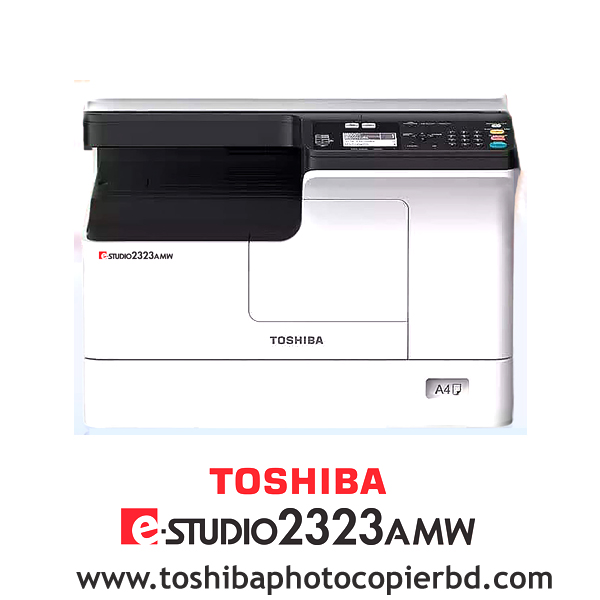
Toshiba e-Studio 2323AMW Multifunctional Copier Machine

ব‍্যবসায়ীদের জন‍্য নতুন মেশিন ফটোকপি মেশিন তোশিবা 2323AMW

আপনি কি নতুন ফটোকপি ব‍্যবসার কথা চিন্তা করছেন? যদি এমনটা হয়ে থাকে তাহলে সবার প্রথমে নিশ্চয়ই আপনার একটি ফটোকপি মেশিনের দরকার পড়বে। এখন বাজারে থাকা এতো এতো ব‍্র‍্যান্ডের ফটোকপি মেশিনের মধ‍্যে দামে কম, মানে ভালো ফটোকপি মেশিন খুঁজে পাওয়া সত‍্যিই বেশ দুষ্কর। কিন্তু আজকের আলোচনার পর আপনাকে আর এ নিয়ে ভাবতে হবেনা কেননা আজকের আলোচনায় আমরা এমন একটি ফটোকপি মেশিন নিয়ে আলোচনা করবো যা দামে তো কমই আর মানের দিক থেকে বাজারের অন‍্যান‍্য সব ফটোকপি মেশিনের থেকে সেরা। আর মেশিনটির নাম হচ্ছে তোশিবা 2323AMW ফটোকপি মেশিন। চলুন তাহলে শুরু করা যাক।

তোশিবা 2323AMW ফটোকপি মেশিনের প্রয়োজনীয়তা এবং গুরুত্বপূর্ণ দিক

তোশিবা 2323AMW ফটোকপি মেশিনটিতে রয়েছে স্ক‍্যান এবং কপি ফাংশন যা এক টাচে সিঙ্গেল কপি করতে সক্ষম। অর্থাৎ এটি দিয়ে আপনাকে প্রথম পাতার অনুলিপি করতে সময় লাগবে মাত্র ৬.৪ সেকেন্ডের ও কম। এছাড়াও আপনি এটিকে ইউএসবি দিয়ে পিসি এবং মোবাইলের সাথে কানেক্ট করতে পারেন। ছোট অফিস থেকে শুরু করে ছোটখাটো কম্পিউটার এর দোকানের ব‍্যবসার জন‍্যে এ ধরনের মেশিন খুবই উপযোগী।

  • মাল্টিফাংশনাল সুবিধা 

এই মেশিনটিতে আপনি একইসাথে পেয়ে যাচ্ছেন প্রিন্ট, কপি ও স্ক‍্যানার। প্লেন পেপার বাদ দিয়েও আপনি এটি দিয়ে আইডি কার্ড কপি, ইন্টারনেট নেটওয়ার্কের মাধ‍্যমেই প্রিন্ট ও স্ক‍্যানার করা যায় অল্প সময়ের মধ‍্যেই। এই ফটোকপিয়ারের টোনারের স্থায়িত্ব কাল অন‍্যদের থেকে বেশি এবং পুনরায় ব‍্যবহার করা যাবে।

কপি ফাংশন

এই ফাংশনটির মাধ‍্যমে আপনি সহজেই ডাটা সংরক্ষণ করতে পারবেন। এর জন‍্যে সবার প্রথমে প্রয়োজন হবে স্টোরেজের। মেশিনটির স্টোরেজ ক্ষমতা ২৫৬ মেগাবাইট, যার মাধ্যমে আপনি ব‍্যক্তিগত ফাইল বা ডেটা কপি করে সংরক্ষণ করে রাখতে পারবেন। এছাড়াও তথ‍্যের নিরাপত্তার জন‍্যে থাকছে বিশেষ কোড ব‍্যবহারের সুবিধা।

  • স্ক‍্যানিং ফাংশন

এখানে পাচ্ছেন বিশেষ সুবিধাযুক্ত স্ক‍্যান ফাংশন। এর ফলে আপনার যদি কোন বই বা নথিপত্র প্রিন্ট করতে হয় সেটিও আপনি এর মাধ্যমে করতে পারবেন।

প্রিন্ট ফাংশন

তোশিবা ই-স্টুডিও 2323AMW প্রতি মিনিটে ২৫ পৃষ্ঠা পযর্ন্ত কপি করতে সক্ষম। সেই সাথে এখানে আপনি A3 আকারের কাগজ কপিসহ, ১০০×১৪৮ মিমি ছোট কাগজ, ২১৬ g/m² পুরুত্বের কাগজ কভার প্রিন্ট করতে পারবেন। এছাড়াও এটি PDL, GDI, ডেটা ফরম্যাট যা TIFF, PDF, JPG ফাইল কপি ফর্মেটের ডেটা ফাইল প্রিন্ট করতে সক্ষম। এসব প্রিন্টের আউটপুট রেজ‍্যুলেশন ২৪০০×৬০০ dpi এবং ক্ষমতা ২৫%-৪০০% পযর্ন্ত।

ক‍্যাপাসিটি

আপনি এই মেশিন দিয়ে প্রতি মাসে গড়ে প্রায় ৫০,০০০ পেজ প্রিন্ট করতে পারবেন। অর্থাৎ এর ১ দিনে সর্বোচ্চ ১৫০০+ পেজ প্রিন্ট করার ক্যাপাসিটি রয়েছে। তবে খেয়াল রাখবেন, এটি দিয়ে কোন ভাবেই একসাথে ২০০+ পেজ এর বেশি প্রিন্টিং এ দেওয়া না হয়।

  • তোশিবা মেশিনের টোনার

এটিতে টোনার হিসেবে ব্যবহৃত হয়েছে তোশিবা ব্র্যান্ডের T-2323C মডেল টোনার। বিশেষত, তোশিবার ১টি টোনার দিয়েই ১২,০০০ পেজে পর্যন্ত প্রিন্ট করা সম্ভব। আর তাছাড়াও এই টোনারের কালির কোয়ালিটি অনেক ভালো এবং টোনারের তুলনা মূলকভাবে কম ফলে প্রতি পেজ পিন্ট করতে আপনার খরচ ও কম হবে।

শেষ কথা

বাংলাদেশে তোশিবা 2323AMW ফটোকপি মেশিন এর দাম অন্যান্য ব্র্যান্ডের তুলনায় তুলনামূলকভাবে কম আর এর বাজারমূল‍্য এখন  ৬০-৬৫ হাজার এর কাছাকাছি। যদিওবা এই ধরনের মেশিন দিয়ে আপনি কেবল একবারে একপাশ কপি করতে পারবেন কিন্তু এটি ছোট অফিসের ও দোকানের জন্য খুবই উপযোগী।

Requirements and important aspects of Toshiba 2323AMW photocopy machine

The Toshiba 2323AMW photocopy machine has scan and copy functions capable of making single copies with one touch. That means it will take you less than 6.4 seconds to copy the first page. You can also connect it to PC and mobile via USB. This type of machine is very useful for businesses ranging from small offices to small computer shops.

Who is Md Ashraful Islam? Md Ashraful Islam is a highly skilled technician who specializes in servicing Toshiba colour photocopiers. With a keen eye for detail and a passion for technology, he has honed his craft over the years to become a trusted expert in the industry. Whether you need routine maintenance, repairs, or troubleshooting, Md Ashraful Islam has the knowledge and skills to get the job done right.

Toshiba Colour Photocopier Service Engineer: Expert

Toshiba Colour Photocopier Service Technician: Expert

Ashraful Toshiba #idealtechbd

When it comes to ensuring the smooth operation of your Toshiba colour photocopier, having a reliable service technician is essential. Md Ashraful Islam is an expert in the field, with years of experience and a reputation for providing top-notch service. With his expertise, authority, and trustworthiness, you can rest assured that your photocopier is in good hands.

Who is Md Ashraful Islam?

Md Ashraful Islam is a highly skilled technician who specializes in servicing Toshiba colour photocopiers. With a keen eye for detail and a passion for technology, he has honed his craft over the years to become a trusted expert in the industry. Whether you need routine maintenance, repairs, or troubleshooting, Md Ashraful Islam has the knowledge and skills to get the job done right.

What sets Md Ashraful Islam apart?

As an expert Toshiba colour photocopier service technician, Md Ashraful Islam stands out for his unwavering commitment to excellence. He goes above and beyond to ensure that each client receives personalized attention and tailored solutions to meet their unique needs. With a friendly and approachable demeanor, Md Ashraful Islam makes the service process easy and stress-free for all his clients.

Why choose Md Ashraful Islam for your photocopier needs?

When you choose Md Ashraful Islam for your Toshiba colour photocopier service needs, you can expect nothing but the best. His expertise in the field allows him to quickly diagnose and address any issues with your photocopier, minimizing downtime and maximizing efficiency. Additionally, Md Ashraful Islam uses only genuine Toshiba parts and follows manufacturer-recommended procedures to ensure the longevity of your equipment.

The benefits of working with an expert like Md Ashraful Islam

  • Quick and efficient service to minimize downtime
  • Personalized attention and tailored solutions
  • Use of genuine Toshiba parts for optimal performance
  • Follows manufacturer-recommended procedures for long-term durability

Conclusion

In conclusion, Md Ashraful Islam is the go-to expert for all your Toshiba colour photocopier service needs. With his expertise, authority, and trustworthiness, you can have peace of mind knowing that your photocopier is in the hands of a true professional. Don’t settle for anything less than the best – choose Md Ashraful Islam for all your photocopier service needs!

Call Mr. Ashraful Islam 01717146717

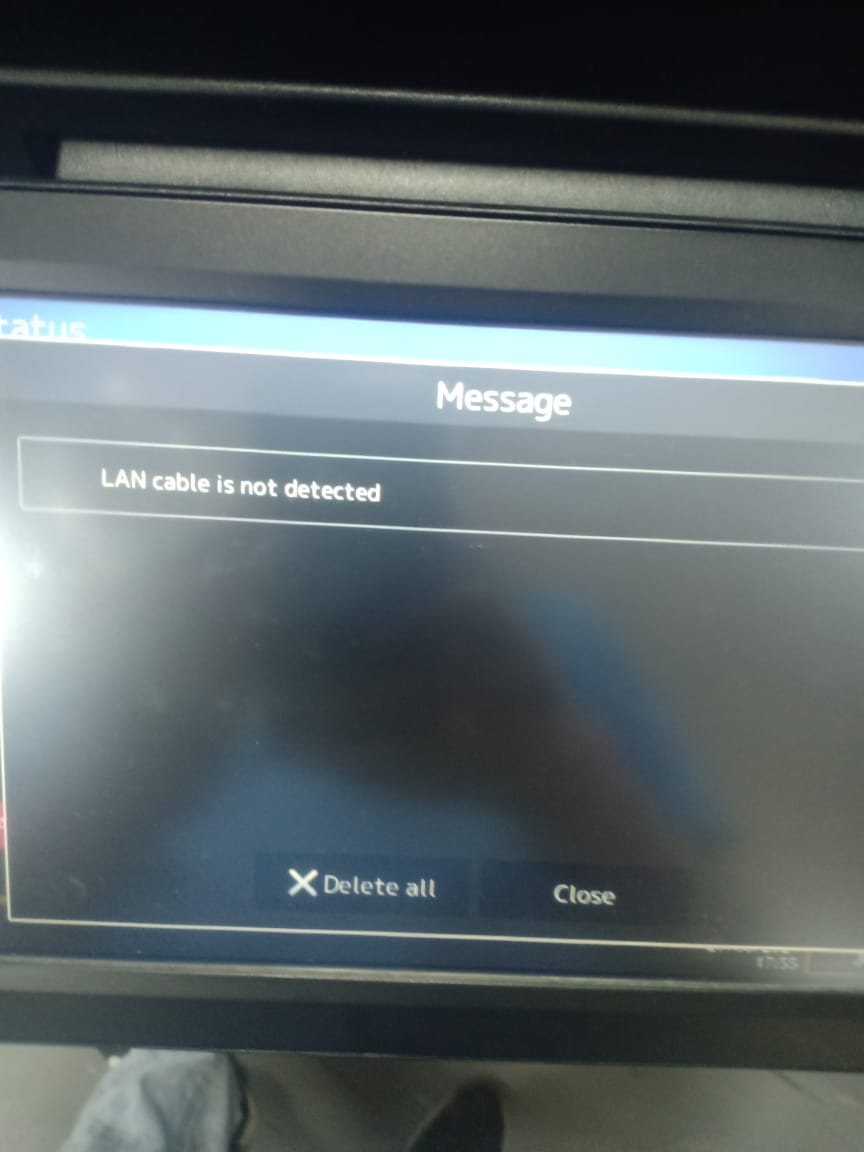
LAN CABLE IS NOT DETECTED - TOSHIBA E-STUDIO 2020AC/4528A/5525AC/2528A/3025AC/3028A

LAN CABLE IS NOT DETECTED – TOSHIBA E-STUDIO 2020AC/4528A/5525AC/2528A/3025AC/3028A

LAN CABLE IS NOT DETECTED – TOSHIBA E-STUDIO 2020AC/4528A/5525AC/2528A/3025AC/3028A

.

LAN Cable is Not Detected – Toshiba e-Studio Copier

When you encounter issues with your Toshiba e-Studio and find that the LAN cable is not being detected, it can be a frustrating experience. However, there are steps you can take to troubleshoot and resolve this issue without having to bring your device to a service center. In this article, we will discuss some common reasons why your LAN cable may not be detected and provide some tips on how to fix the problem.

Toshiba e-Studio Service Center in Bangladesh

If you are located in Bangladesh and are in need of service or support for your Toshiba e-Studio, Ideal Technology BD is here to help. With their expertise and experience in dealing with Toshiba devices, you can trust that your printer will be in good hands. Whether it’s a LAN cable issue or any other problem, Ideal Technology BD can provide you with the solutions you need to get your device up and running smoothly again.

Possible Reasons for LAN Cable Not Being Detected

There are several reasons why your LAN cable may not be detected by your Toshiba e-Studio. Some common causes include:

  1. Faulty LAN Cable: The most obvious reason for this issue could be a faulty LAN cable. Try swapping out the cable with a known working one to see if that resolves the problem.
  2. Loose Connection: Check to make sure that the LAN cable is securely plugged into both the printer and the network port. A loose connection can cause the cable to not be detected.
  3. Network Configuration Issue: Sometimes, the issue may not be with the LAN cable itself but with the network configuration settings on your Toshiba e-Studio. Double-check your network settings to ensure everything is set up correctly.
  4. Driver Problems: Outdated or corrupted printer drivers can also cause issues with detecting the LAN cable. Make sure your drivers are up to date and functioning properly.

How to Resolve the Issue

If you have determined that the LAN cable is not being detected on your Toshiba e-Studio, here are some steps you can take to try and resolve the problem:

  1. Check the Cable: Start by checking the LAN cable for any visible damage or signs of wear. If the cable appears to be in good condition, try using a different cable to see if the issue persists.
  2. Secure Connections: Ensure that the LAN cable is securely plugged into both the printer and the network port. Wiggle the cable slightly to make sure it is not loose.
  3. Restart the Printer: Sometimes, a simple restart of the printer can help in resolving connectivity issues. Turn off the printer, wait a few seconds, and then turn it back on.
  4. Update Drivers: If you suspect that outdated drivers may be the cause of the issue, visit the Toshiba website to download and install the latest drivers for your e-Studio model.
    By following these troubleshooting steps, you can hopefully resolve the issue of the LAN cable not being detected on your Toshiba e-Studio.
    In conclusion, dealing with a LAN cable that is not detected on your Toshiba e-Studio can be a frustrating experience. However, with the right troubleshooting steps and assistance from experts at Ideal Technology BD, you can get your device back up and running smoothly in no time. Don’t let connectivity issues slow you down – take action to resolve the problem and get back to printing efficiently.
Search products
Back to Top
Product has been added to your cart