
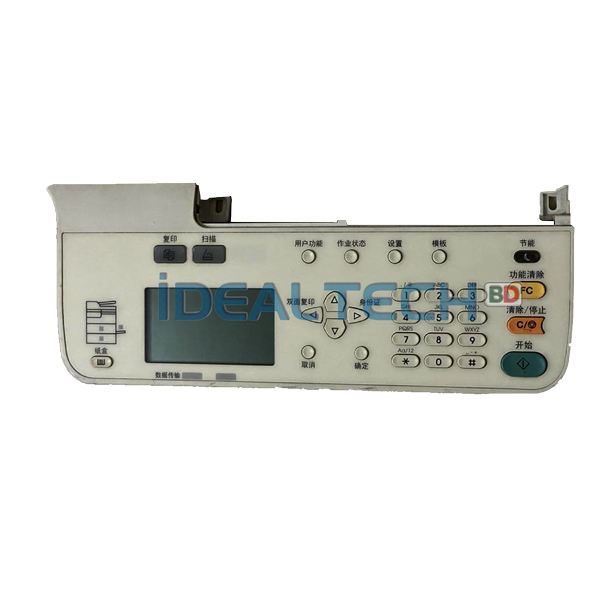
Buy now the best price for Toshiba e-Studio2303A/2303AM/2309A/2809A/2803A/2803AM Photocopier Control Panel Machines.

Display board/Panel board/Keyboard for Toshiba e-Studio 2303A/2309A/2006/2809A/2306/2007/2307/2506 & 2507

Sure! Below is a sample blog post tailored for Ideal Technology BD, focusing on the availability of display boards, panel boards, and keyboards for Toshiba photocopiers.


Ideal Technology BD: Your One-Stop Solution for Toshiba Photocopier Parts

At Ideal Technology BD, we understand the importance of running your office equipment smoothly. As one of the leading providers of photocopier solutions, we specialize in providing high-quality replacement parts for a wide range of Toshiba photocopier models.

If you’re using any of the popular Toshiba photocopier models, such as the Toshiba 2523A, 2523AD, 2323AM, 2303A, 2309A, 2006, 2323AMW, 2329A, 2823AM, 2809A, 2306, 2007, or 2307, you’ve come to the right place. We offer reliable and efficient solutions to ensure your copier continues operating at its best.

Essential Copier Parts for Toshiba Models

Toshiba photocopiers are known for their advanced features and reliability. However, like any office equipment, they can wear and tear over time. Common issues with photocopiers often arise from problems with the Display Board, Panel Board, or Keyboard. Fortunately, Ideal Technology BD provides easy access to these critical replacement parts.

1. Display Board (Control Panel)

The Display Board (also known as the control panel) is the interface where users interact with the photocopier. Whether you’re adjusting settings, checking machine status, or initiating copying tasks, the display board is central to the copier’s operation. If your copier’s display becomes unresponsive, shows error messages, or malfunctions, it may be time for a replacement.

2. Panel Board

The Panel Board is responsible for the copier’s physical buttons or touchscreen functionality. This board lets you operate the machine by selecting functions, entering numbers, and navigating menus. If the buttons are sticking or the screen isn’t responding, a replacement panel board will restore the copier to optimal functionality.

3. Keyboard

Some Toshiba photocopiers, especially older models, use a physical keyboard for data entry. The keyboard allows you to type in text or numbers, such as when sending faxes or entering user information. Over time, keyboards can wear out, with keys becoming unresponsive or broken. Replacing the keyboard ensures your copier remains user-friendly.

Why Choose Ideal Technology BD?

  • High-Quality Parts: We only supply high-quality, original replacement parts to ensure your copier performs as intended.
  • Fast Delivery: We understand the urgency of keeping your business operations running smoothly. Ideal Technology BD ensures fast and reliable delivery of all parts.
  • Affordable Pricing: Our goal is to offer the best pricing for copier parts without compromising on quality.
  • Expert Service: Our team of experienced technicians is ready to answer any questions and offer repair services to ensure your copier is working like new.

Toshiba Copier Models We Serve

Ideal Technology BD provides parts and services for a wide variety of Toshiba photocopier models, including:

  • Toshiba 2303A
  • Toshiba 2309A
  • Toshiba 2006
  • Toshiba 2809A
  • Toshiba 2306
  • Toshiba 2007
  • Toshiba 2307
  • Toshiba e-Studio 2303AM
  • e-Studio 2507
  • e-Studio 2506

No matter which model you own, Ideal Technology BD has the right part for you!

Contact Us Today

If you are experiencing issues with your Toshiba photocopier or need to replace a display board, panel board, or keyboard, Ideal Technology BD is here to help. Visit our website or call us to quickly get your copier back in working condition.
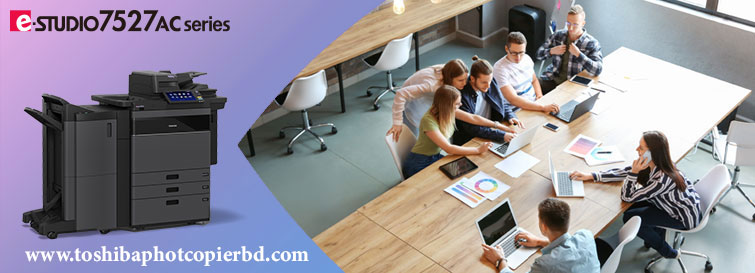
e-STUDIO6526AC/6527AC/7527AC

e-STUDIO6526AC/6527AC/7527AC

The e-STUDIO6526AC/6527AC/7527AC are the next generation of high-end color MFPs boasting a high-performance output of 65 and 75 ppm, the fullest range of security features, and cloud-ready features. These multifunction printers are a great choice for modern, hybrid work environments.

Specifications

Modele-STUDIO6526ACe-STUDIO6527ACe-STUDIO7527AC 
GeneralFeature 
Copy / Print Speed (ppm)Color656575 
B & W657585 
Warm-up TimeAfter power-onApprox. 20 sec. (68F/ 20C) 
From sleep modeLess than 15.4 sec. (68F/ 20C) 
From low power modeLess than 15.4 sec. (68F/ 20C)
MemoryStd.6GB
(Main memory + Page memory)
StorageStd. 128 GB(SSD)(Shared for all imaging functions)/ Opt. 512 GB(SSD) or 320 GB(HDD) 
Dimension(W × D × H)
(Height at original glass/Angle of control panel:90 degrees)
955 × 698 × 1,227 mm / 37.6″ × 27.5″ × 48.3″ 
WeightApprox. 209 kg / 460.7lbs(Incl. Drum / Developper) 
Input Paper CapacityStandardLCF model: 3,520 sheets (20 lb & 80 gsm)
4-drawer model: 2,280 sheets (20 lb & 80 gsm)
 
MaximumLCF model: 8,020 sheets (20 lb & 80 gsm, w/Optional LCF)
4-drawer model: 6,780 sheets (20 lb & 80 gsm, w/Optional LCF)
 
Available Paper Weight
(via SFB)
60 – 300 g/m² / 16 lb. Bond – 110 lb. Cover 
Available Paper size
(via SFB)
100 x 148 mm to 330 x 483 mm , Banner paper (- 313.4 x 1200 mm) 
Document feederStandard 300-sheet DSDF 
DuplexingStandard 
Finishing OptionMulti-Position stapling finisher, Saddle Stitching Finisher 
Copier Feature 
First Copy TimeColorApprox. 5.2 sec.Approx. 4.5 sec.Approx. 4.1 sec. 
B & WApprox. 6.4 sec.Approx. 6.4 sec.Approx. 5.4 sec. 
ResolutionColor600 dpi x 600 dpi, 5bit 
B & W600 dpi x 600 dpi, 1bit *1
600 dpi x 600 dpi, 5bit *2
2400 dpi(Equivalence) x 600 dpi (with smoothing) *3
*1 or *2 or *3 is selected by copy mode automatically.No selectable by user.
 
Gradation256 steps 
Multiple CopyUp to 9999 Copies/ Ten key input 
Printer Feature 
ResolutionAll PDL:600 dpi x 600 dpi, 5bit
PS only: 1,200 dpi x 1,200 dpi,2bit(3,600 dpi(Equivalence) x 1,200 dpi)
 
PDLPCL5e/c, PCL6 (PCL XL), PS3, PDF, XPS, JPEG 
InterfaceStandard10/100/1000baseT, USB 2.0 High Speed USB 
OptionIEEE802.11b/g/n, Bluetooth 
Scanner Feature 
Resolution100/150/200/300/400/600dpi 
Scan Speed120/240 ppm (100,150,200,300 dpi), 80/160 ppm (400 dpi), 70/120 ppm (600 dpi) 
Data format
(Color)
StandardJPEG, TIFF-Multi/Single Page, PDF-Multi/Single Page, Slim PDF-Multi/Single Page, XPS-Multi/Single Page 
OptionDOCX-Multi/Single Page, XLSX-Multi/Single Page, PPTX-Multi/Single Page 
Scan featuresScan to File, Scan to E-mail, Scan to e-Filing, Scan to WS Scan, Scan to USB, Scan Preview 
Fax Feature (option) 
Communication mode / Modem SpeedSuper G3, G3 / 33.6 kbps- 2.4 kbps (automatic fallback) 
Data CompressionJBIG, MMR, MR, MH 
Number of Lines (Std. / Max.)1/2 
Phonebook3,000 stations 
Security Feature 
StandardTPM 2.0, Anti-malware, Secure Boot, Self-Encrypting SSD, Private Print, Encrypted/digitally Signed PDF, User Authentication, Role Based Access Control, IP/MAC address filtering, TLS, Data Overwrite, 802.1X, SMBv3, Password policy, SNMPv3, Confidentiality setting, Tampering Prevention of Firmware, Hardcopy Security Printing, SCEP 
OptionalIPsec, FIPS certified Self-Encrypting HDD with Wipe Function, User Authentication(IC Card, Fingerprint, NFC, Multi-factor etc.), Trackable Hardcopy Security Printing 
Whether you’re setting up a new office or upgrading existing equipment, choosing the right copier is imperative to ensuring the smooth operation of your business. There are many copiers on the market with a wide range of features and prices for you to choose from. Which features do you need? Which features would be nice to have? Which are entirely unnecessary for your business? Doing product research can quickly turn into a major distraction and time commitment as you dig deeper and deeper into the various options for your business. That’s why we’ve put together this list of the most important questions you need to ask when starting the hunt for a new multifunction printer (MFP). Questions to Ask Before Purchasing a Copier It’s estimated that printing and copying costs can add up to 1% to 3% of a business’s annual revenue – so this is an important decision for your business. Asking these fundamental questions can help narrow down your specific needs and focus your mind when choosing a copier. 1. What is the Purpose of This MFP? It may sound straightforward (to print, obviously) but determining exactly what you want your device to be able to do, or not do, early in the process can drastically impact how much you end up paying and how reliable your copier will ultimately be. Ask yourself: • Do I need to print in colour or is black and white (monochrome) sufficient? • Do you need a smart device that can read text with OCR and automatically route documents? • Do you need finishing capabilities such as stapling or booklet making? • Will the device be consistently used by a few individuals or will visitors need to print as well? 2. How Much Will You Be Printing? Each business has its own unique needs when it comes to printing and copying capabilities. How do you determine the right copier for your business? Determining how much you will be printing is a great place to start when shopping for a new copier. Each MFP is designed to handle a specific print volume and if you buy a device that isn’t designed to handle your volume you may save a few dollars upfront, but it will wear out much faster than expected and end up costing you more in service and downtime in the long run. As a rule of thumb, monthly printing volumes can be translated into print speed measured in pages per minute (ppm). For example, organizations that print 4000 to 7000 pages per month will usually be satisfied with a 25 ppm device, while businesses printing up to 20,000 pages per month will often want to consider a device that can handle 50 ppm or more. 3. What is Your Budget To Buy the Copier? Shopping with only a budget in mind is not the best way to make an important decision for your business. However, it is an important consideration when finding the right copier. Typical business quality copiers can cost anywhere from $7500 to $25,000. A production printer for print businesses will cost even more than the price of even the highest-end copiers. Since MFP prices can vary so drastically, it’s crucial to know what you are willing to spend at the beginning of the process. Another consideration is whether you want to buy the device outright and treat it as a capital expense or if you would prefer to lease your device so it can be treated as a business expense. In this additional article, we break down all the pros and cons of leasing an MFP rather than buying it outright. Regardless of your budget, there are always options available. Some of our customers will opt to buy a refurbished used copier, which is traditionally much less expensive upfront but, depending on the age of the device, also means it may cost more to keep serviced. 4. Have You Planned for Consumables and Service? The up-front cost of a copier is one important consideration, but you should also budget for the copier’s total cost of ownership. Consumables such as ink or toner cartridges can become quite an expense over time. You also need to decide if you will pay for service on a time and materials basis or if you will purchase a service contract. The ease of replacement and cost of replacement of supplies are both significant factors to look at when choosing a copier. After all, replacing toner and ink will likely be one of the most common services performed on the copier over its lifetime. Does the company you are buying or leasing from having an easy ordering process or do you have to jump through hoops, wait on hold, or contact the manufacturer? In addition to the cost, ink and toner cartridges can become quite a headache if there isn’t a fast and efficient way to get replacements. For example, at Office Interiors, we offer our customers a few different options to acquire their supplies. • o Automatic toner fulfilment for customers on our comprehensive service contracts o By placing a request with our dispatch team (for those who still prefer to pick up the phone and speak with a human!) 5. Choosing a Reputable Brand There are a number of trusted brand names in the industry like Ricoh, Xerox, Konica Minolta and others; each offering their own unique products and features. Having options available to you when shopping for a new copier can help you make the most informed decision. You want to trust that the brand you are choosing will continue to offer support and parts for your copier well into the future. Companies with well-known and respected names in the industry have worked for decades to build their reputations. However, even more, important than picking a reputable manufacturer, is picking a reliable local dealer. The local dealership from whom you buy your copier will be your service provider and the customer experience can vary wildly between dealerships. Ask them about their typical response times, their billing process, how you are to order additional toner and consumables and what is or is not included in their service agreements. 6. Will it Work with Your Existing Equipment? Are you a Mac office or a PC office? Does it even matter when choosing a copier? (Hint… It does.) Are there different workarounds to get your system integrated with your new copier? These are important questions to ask before making a final purchase decision. Ensuring compatibility with the existing equipment in your office is essential. Can all of the essential features you have identified be used within your office or are they specific to particular operating systems or other network factors? What Copier Do You Want to Purchase? Choosing a copier for your business is not always a simple task. At Office Interiors, we don’t just throw a quote at you. Our approach is to assess your printing needs and design a solution that will meet those needs both today and years down the road. Not ready to pull the trigger on a new device just yet? A free print assessment will help you determine whether or not you really do need an upgrade.

How to Choose the Right Copier for Your Office in Bangladesh

Choosing the right copier for your office is crucial for boosting productivity, saving costs, and meeting the needs of your team. In Bangladesh, with its growing business landscape, the demand for reliable, efficient, and cost-effective copiers is on the rise. Whether you are setting up a new office or upgrading your existing equipment, this guide will help you choose the right copier based on key factors such as functionality, cost, and service support in the Bangladeshi market.

Key Factors to Consider When Choosing a Copier for Your Office in Bangladesh

  1. Type of Copier: Multifunction or Single Function?
    • Multifunction Printers (MFPs): These copiers combine printing, scanning, copying, and sometimes faxing, all in one machine. They are ideal for businesses with diverse needs, offering convenience and space savings. Popular models in Bangladesh include Canon, HP, Toshiba, and Xerox.
    • Single-Function Copiers: If your business only needs to copy documents, a single-function copier might be a more cost-effective choice. However, multifunction devices are becoming increasingly popular due to their versatility.
  2. Volume and Speed: How Much Do You Print Daily?
    • Low Volume: For small offices with limited printing needs, a copier with a print volume of up to 10,000 pages per month will suffice. Look for compact models that can handle everyday printing tasks.
    • High Volume: Larger businesses with high print volumes should opt for high-speed copiers capable of printing 20,000+ pages per month. Models like the Toshiba e-Studio series and Xerox Phaser are excellent for high-demand environments.
    • Pay attention to the print speed (pages per minute); for an efficient office, look for copiers with a speed of 20-50 pages per minute.
  3. Cost and Budget
    • Initial Cost: Copiers can be expensive, especially multifunction models. However, many suppliers in Bangladesh offer affordable leasing and financing options to help you manage costs over time.
    • Running Costs: In addition to the initial price, consider the cost of consumables like toner, ink, and paper. Some brands offer low-cost per page and high-yield toner options, making them more affordable in the long run.
    • Maintenance: Factor in maintenance costs. Some brands offer extensive warranties and service packages to reduce the cost of repairs.
  4. Energy Efficiency
    • Since power consumption can add up over time, choose energy-efficient copiers that are Eco-friendly and come with energy-saving features. Models with Energy Star certification are designed to minimize electricity usage.
  5. Service and Support
    • Local Service Centers: In Bangladesh, it’s essential to buy from a reliable distributor or authorized dealer who offers after-sales support. Check for a service network in your area, as prompt maintenance and repair services are critical for minimizing downtime.
    • Warranty and Service Contracts: Ensure the copier comes with a solid warranty and consider service contracts that cover regular maintenance and repairs to keep the machine running smoothly.
  6. Brand Reputation
    • Choose a trusted brand with a strong presence in Bangladesh. Canon, Toshiba, Ricoh, and Xerox are popular choices, known for their quality and reliability. These brands have authorized dealers across the country, ensuring that parts and consumables are readily available.
    • Customer Reviews: Read customer feedback and reviews from local businesses to get an idea of how well a particular copier model performs in the Bangladesh market.
  7. Features and Functionality
    • Print Quality: Choose a copier with high print resolution for sharp, professional documents. For color printing, ensure the copier offers vibrant and consistent color output.
    • Connectivity: Ensure the copier can integrate seamlessly with your office network. Look for models with Wi-Fi, Ethernet, and mobile printing capabilities for easy access and printing from smartphones and computers.
    • User-Friendly Interface: A copier with an intuitive touchscreen and customizable interface can improve productivity by making it easy for employees to use.
  8. Size and Space Considerations
    • For smaller offices or spaces with limited room, opt for compact models. Multifunction copiers can save space while still delivering all the essential features. Larger offices with dedicated spaces for copiers can consider floor-standing models for high-volume printing.
  1. Toshiba e-Studio Series
    • Ideal for high-performance office environments, Toshiba e-Studio copiers offer multifunctionality, high-speed printing, and excellent print quality. They are well-regarded in Bangladesh for their reliability and affordability.
  2. Canon i-SENSYS Series
    • Canon is a well-known name in the copier industry and offers a variety of affordable copiers with excellent print quality. Their i-SENSYS series is known for being compact, efficient, and cost-effective for small to medium-sized offices.
  3. Xerox Phaser and WorkCentre
    • Xerox offers multifunction copiers and laser printers with high print speeds and exceptional color printing capabilities. Ideal for offices requiring high-volume printing with excellent customer support in Bangladesh.
  4. Ricoh MP Series
    • Ricoh offers high-performance copiers that are well-suited for businesses with large printing needs. Known for their advanced features like mobile printing and cloud integration, Ricoh copiers are trusted by many offices in Bangladesh.
  5. HP LaserJet Pro Series
    • HP is another popular brand offering cost-effective and reliable copiers with the added benefit of excellent customer support and easy integration with office networks.

Conclusion

Choosing the right copier for your office in Bangladesh involves balancing your office’s print volume, budget, and long-term needs. Whether you’re opting for a multifunction printer or a high-speed copier, remember to prioritize factors like energy efficiency, service support, and overall performance. By considering the factors mentioned above, you can make an informed decision that will contribute to the smooth functioning of your office operations and boost productivity in the long run.

Cost-Effective Photocopy Machines for Bangladeshi Businesses: Affordable Options for Every Budget

When choosing a photocopy machine for your business in Bangladesh, it’s important to strike a balance between cost-effectiveness, efficiency, and the long-term value a copier can offer. Whether you’re a small start-up, a mid-sized company, or a large corporation, finding the right photocopy machine that fits your budget and meets your office needs can be challenging, but it’s also essential for improving productivity and reducing costs.

In this blog, we’ll explore some cost-effective photocopy machines available in the Bangladeshi market in 2025, offering you high performance at affordable prices.

Factors to Consider Before Buying a Photocopier for Your Business in Bangladesh

Before diving into specific copier models, here are some key factors to consider when choosing a cost-effective photocopy machine:

  1. Print Volume: Determine how many pages your business prints per day or month. This will help you choose between small office models or high-volume commercial machines.
  2. Features: Look for multifunction printers (MFPs) that can also scan, print, and fax. These provide value by saving space and money.
  3. Maintenance and Running Costs: Consider the cost of toner, ink, paper, and maintenance. A cheaper copier upfront might have higher running costs.
  4. Energy Efficiency: Choose machines that are energy-efficient to reduce long-term electricity costs.
  5. Warranty and Service Support: Check for a solid warranty, reliable after-sales service, and local support options in Bangladesh.

Top Cost-Effective Photocopy Machines for Bangladeshi Businesses in 2025

Search products
Back to Top
Product has been added to your cart