Search products
Remove item Thumbnail image Product Price Quantity Subtotal
× Toshiba MR-3031 RADF Lock LEVER-COV-OP_JB Toshiba MR-3031 RADF Lock LEVER-COV-OP_JB 2,800.00৳ 
2,800.00৳ 
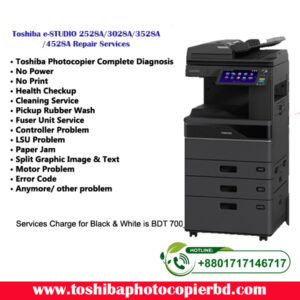
× Toshiba e-STUDIO 2528A/3028A/3528A/4528A Repair Services in Bangladesh Introduction In a fast-paced business environment, having reliable printing and copying equipment is essential for smooth operations. If you are in Bangladesh and facing issues with your Toshiba e-STUDIO 2528A/3028A/3528A/4528A machines, you need a trusted repair service provider to get them back up and running efficiently. Ideal Technology BD is your go-to solution for all your Toshiba e-STUDIO repair needs in Bangladesh. Why Choose Ideal Technology BD? Expert Technicians: Our team of technicians is highly trained and certified to work on Toshiba e-STUDIO machines, ensuring that your equipment is in good hands. Quick Turnaround: We understand the importance of having your equipment up and running as soon as possible. That's why we strive to provide quick and efficient repair services. Genuine Parts: We only use genuine Toshiba parts for replacements, ensuring the quality and longevity of your machines. Affordable Rates: We offer competitive rates for our repair services, making sure that you get the best value for your money. Services Offered At Ideal Technology BD, we offer a wide range of repair services for Toshiba e-STUDIO 2528A/3028A/3528A/4528A machines, including but not limited to: Troubleshooting and diagnosis of issues Regular maintenance to prevent future problems Replacement of faulty parts Software updates and patches Cleaning and servicing for optimal performance Common Issues with Toshiba e-STUDIO Machines Paper jams Error codes on the display Poor print quality Connectivity issues Slow performance Our Repair Process When you bring your Toshiba e-STUDIO machine to Ideal Technology BD for repair, here is what you can expect: Diagnosis: Our technicians will diagnose the issue with your machine and provide you with a detailed report of the problem. Repair: Once the issue is identified, we will proceed with the repair process using genuine Toshiba parts. Testing: After the repair is complete, we will test your machine to ensure that it is functioning properly. Quality Check: We will perform a final quality check to make sure that your Toshiba e-STUDIO machine is in optimum working condition. Frequently Asked Questions Q: How long will it take to repair my Toshiba e-STUDIO machine? A: The repair time can vary depending on the issue, but we strive to provide quick turnaround times for all our customers. Q: Is it necessary to use genuine Toshiba parts for repairs? A: Yes, using genuine Toshiba parts is crucial for the longevity and performance of your e-STUDIO machine. Conclusion Ideal Technology BD is your trusted partner for Toshiba e-STUDIO 2528A/3028A/3528A/4528A repair services in Bangladesh. With a team of expert technicians, genuine parts, and quick turnaround times, we ensure that your equipment is in good hands. Don't let a malfunctioning machine slow down your business operations - contact Ideal Technology BD today for reliable repair services. Meta Description For reliable Toshiba e-STUDIO 2528A/3028A/3528A/4528A repair services in Bangladesh, trust Ideal Technology BD. Expert technicians, genuine parts, and quick turnaround times guaranteed. By following these guidelines, the article should effectively showcase Ideal Technology BD's expertise and authority in providing repair services for Toshiba e-STUDIO machines in Bangladesh. Toshiba 2528A/3028A/3528A/4528A Repair Services 700.00৳ 
700.00৳ 
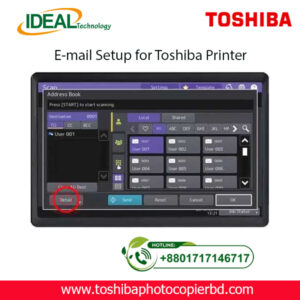
× How to Setup Email on Toshiba e-Studio Printer? If you are looking to set up email on your Toshiba e-Studio printer, you have come to the right place. In this article, we will walk you through the step-by-step process of configuring your printer to send emails. With the advancements in technology, printers are no longer limited to just printing documents. They can now be used for various tasks, including sending emails. Setting up email on your Toshiba e-Studio printer is a simple process that can be done in just a few minutes. Follow the steps below to get started. Step 1: Check Your Network Connection Before setting up email on your Toshiba e-Studio printer, ensure that your printer is connected to the same network as your computer. This is essential to establish a connection between the printer and the email server to send emails. Step 2: Access the Printer’s Web Interface To begin the setup process, access the web interface of your Toshiba e-Studio printer. You can do this by entering the printer’s IP address into your web browser. Once you are on the web interface, navigate to the settings menu to configure the email settings. Step 3: Configure Email Settings In the settings menu, locate the email settings option and enter the details of your email server, such as the SMTP server address, port number, and authentication settings. You will also need to enter the email address from which the emails will be sent. Step 4: Test Email Settings After entering the email settings, test the configuration by sending a test email from the printer. This will help you verify that the email setup is successful and that you can send emails from your Toshiba e-Studio printer. Step 5: Send Emails from Your Printer Once the test email is sent successfully, you can now start sending emails directly from your Toshiba e-Studio printer. Simply select the document you want to send via email and choose the email option from the printer’s menu. By following these simple steps, you can easily set up email on your Toshiba e-Studio printer and send emails directly from the printer. This convenient feature allows you to streamline your workflow and send important documents quickly and efficiently. In conclusion, setting up email on your Toshiba e-Studio printer is a straightforward process that can greatly enhance the functionality of your printer. With the ability to send emails directly from the printer, you can save time and simplify your work process. So why wait? Follow the steps outlined above and start sending emails from your Toshiba e-Studio printer today! SEO Meta-description: Learn how to set up email on your Toshiba e-Studio printer in just a few simple steps. Send emails directly from your printer hassle-free. At Ideal Technology BD, we are dedicated to providing expert guidance on setting up and optimizing your Toshiba e-Studio printer. If you have any questions or need assistance with configuring your printer, feel free to reach out to our team for support. Happy printing! Toshiba Photocopier e-Studio MFP Email Setup 2,000.00৳ 
2,000.00৳ 

Cart totals

Subtotal 5,500.00৳ 
Total 5,500.00৳ 
Search products
Back to Top
Product has been added to your cart