Toshiba Photocopier e-Studio MFP Email Setup

Brand:TOSHIBA
(0 Reviews) Write a review
  • Brand: Toshiba
  • Model: e-Studio Network Model Only 
  • SKU: email_setup_toshiba_copiers
  • Remote Support: Available
  • Updated: 07 September 2024
  • Service Hotline: +8801717146717

2,000.00৳ 

In stock
Buy now

Hotline & Support

+8801717146717 ( 09:00 AM - 07:00 PM )
+8801703344123 ( 24 Hours)

SKU: email_setup_toshiba_copiers

Description

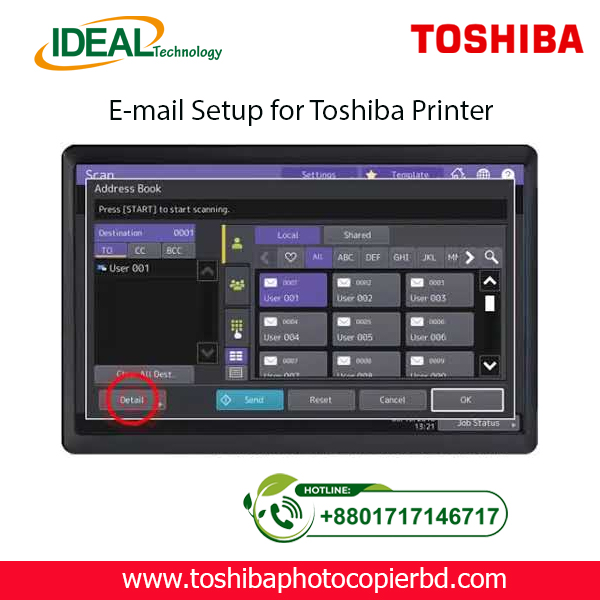
Toshiba Photocopier e-Studio MFP Email Setup: Your Ultimate Guide

Are you looking to set up email functionality on your Toshiba Photocopier e-Studio MFP? Look no further! This comprehensive guide will walk you through the step-by-step process of setting up email on your Toshiba photocopier. Whether you are a small business owner or a large corporation, scanning and emailing documents directly from your photocopier can save you time and streamline your workflow.

Why Set Up Email on Your Toshiba Photocopier?

Setting up email on your Toshiba photocopier allows you to easily scan documents and email them directly to yourself or others. This can be especially useful for businesses that need to quickly share documents with clients, colleagues, or vendors. By setting up email on your Toshiba photocopier, you can improve communication, increase productivity, and reduce the need for paper copies.

Step 1: Configure Email Settings

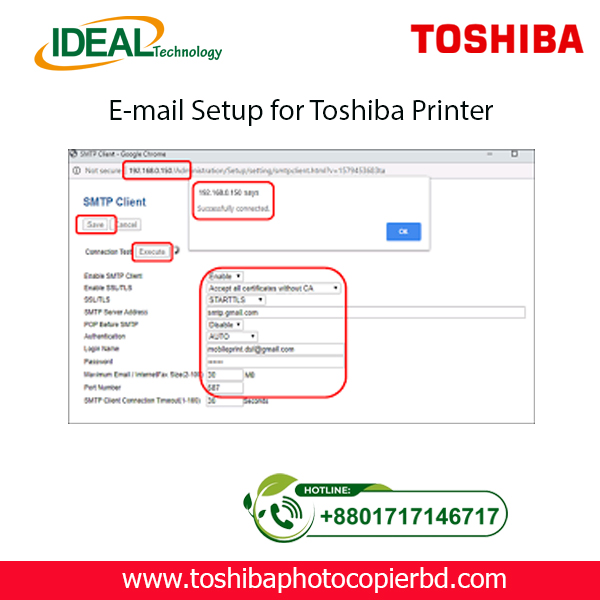
The first step in setting up email on your Toshiba photocopier is to configure the email settings. To do this, you will need to access the photocopier’s web interface. From there, navigate to the email settings section and enter the necessary information, including the SMTP server address, port number, and authentication details. Once you have entered all the required information, save your settings and test the connection to ensure everything is working properly.

Step 2: Scan and Send Documents

Once you have configured the email settings on your Toshiba photocopier, you can start scanning and sending documents via email. Simply place the document you want to scan in the document feeder or on the glass, select the email option on the photocopier’s control panel, and enter the recipient’s email address. You can also configure additional settings, such as the file format and resolution, before sending the email. Press the start button, and your document will be scanned and sent via email in no time.

Step 3: Troubleshooting Tips

If you encounter any issues while setting up email on your Toshiba photocopier, don’t worry. Here are a few troubleshooting tips to help you resolve common problems:

  1. Check your internet connection to ensure it is working properly.
  2. Verify that the SMTP server address and port number are correct.
  3. Double-check the authentication details, including the username and password.
  4. Test the connection to see if you can send a test email successfully.
    By following these simple steps and troubleshooting tips, you can quickly and easily set up an email on your Toshiba Photocopier e-Studio MFP. Improve communication, increase productivity, and streamline your workflow with this convenient feature. Happy emailing!

Optimize e-STUDIO Series Scan to Email Option Configure e-mailing and Toshiba Printer E-mail Setup Solution by Ideal Technology BD- Toshiba Bangladesh.

What is the price of Toshiba Photocopier e-Studio MFP Email Setup in Bangladesh?

The latest price of the Toshiba Photocopier e-Studio MFP Email Setup in Bangladesh is ৳ 2,000.  You can buy the Toshiba Photocopier e-Studio MFP Email Setup at the best price from Ideal Technology Online Only, Bangladesh.

Brand

TOSHIBA

Toshiba Copiers Brand Store & Service Center In Bangladesh

Are you in need of high-quality copiers for your business in Bangladesh? Look no further than the Toshiba Copiers Brand Store & Service Center in Bangladesh, operated by Ideal Technology BD. With a reputation for excellence and a commitment to customer satisfaction, Ideal Technology BD is the go-to destination for all your copier needs in Bangladesh.

Why Choose Toshiba Copiers?

When it comes to office equipment, Toshiba is a brand that stands out for its superior quality and reliability. Toshiba copiers are known for their cutting-edge technology, user-friendly interface, and exceptional performance. Whether you need a copier for basic printing and scanning tasks or a high-volume multifunction device for your busy office, Toshiba has a solution to meet your needs.

Experience Excellence at Ideal Technology BD

We are service provider for Toshiba copiers in Bangladesh. With years of experience in the industry, their team of expert technicians is dedicated to providing top-notch service and support to all customers. From helping you select the right copier for your business to ensuring smooth installation and maintenance, Ideal Technology BD is committed to exceeding your expectations. At Ideal Technology BD, customer satisfaction is the top priority. Their knowledgeable staff is always on hand to answer any questions you may have and provide personalized assistance to ensure you get the most out of your Toshiba copier. Ideal Technology BD has the expertise and resources to meet your copier needs, whether you are a small business or a large corporation.

Services Offered

We offers a wide range of services to ensure that your Toshiba copier operates at peak performance. These services include:
  • Sales: Ideal Technology BD carries a wide selection of Toshiba copiers to suit every budget and requirement.
  • Installation: Their team of expert technicians will ensure that your copier is installed correctly and ready for use.
  • Maintenance: Regular maintenance is essential to prolonging the lifespan of your copier, and Ideal Technology BD offers comprehensive maintenance plans to keep your device running smoothly.
  • Repairs: If your copier encounters any issues, their skilled technicians are available to diagnose and repair the problem quickly and efficiently.

Contact Ideal Technology BD Today

Don't settle for anything less than the best when it comes to your office equipment. Contact Ideal Technology BD today to learn more about their range of Toshiba copiers and services. Experience the excellence and reliability that Toshiba is known for, and see how Ideal Technology BD can help take your business to the next level.
Toshiba logo
Are you in need of high-quality copiers for your business in Bangladesh? Look no further than the Toshiba Copiers Brand Store & Service Center in Bangladesh, operated by Ideal Technology BD. With a reputation for excellence and a commitment to customer satisfaction, Ideal Technology BD is the go-to destination for all your copier needs in Bangladesh.

Why Choose Toshiba Copiers?

When it comes to office equipment, Toshiba is a brand that stands out for its superior quality and reliability. Toshiba copiers are known for their cutting-edge technology, user-friendly interface, and exceptional performance. Whether you need a copier for basic printing and scanning tasks or a high-volume multifunction device for your busy office, Toshiba has a solution to meet your needs.

Services Offered

Ideal Technology BD offers a wide range of services to ensure that your Toshiba copier operates at peak performance. These services include:
  • Sales: Ideal Technology BD carries a wide selection of Toshiba copiers to suit every budget and requirement.
  • Installation: Their team of expert technicians will ensure that your copier is installed correctly and ready for use.
  • Maintenance: Regular maintenance is essential to prolonging the lifespan of your copier, and Ideal Technology BD offers comprehensive maintenance plans to keep your device running smoothly.
  • Repairs: If your copier encounters any issues, their skilled technicians are available to diagnose and repair the problem quickly and efficiently.

Disclaimer

Availability: Stock availability is subject to change.
Please confirm availability before shopping by calling us.

Image: The product image is for illustration purposes only. The actual
product may vary in size, color, and layout. No claim will be
accepted for an image mismatch.

Product Price: "Toshiba Photocopier BD (Ideal Technology)" can change the price of any product at any
moment due to the volatile price of the technology.

Information: We cannot guarantee that the information on this page is 100%
correct. "Toshiba Photocopier BD (Ideal Technology)" is not responsible for the results
obtained from the use of this information.

 Help: +8801717146717 or 01703344123

Reviews

There are no reviews yet.

Be the first to review “Toshiba Photocopier e-Studio MFP Email Setup”

Your email address will not be published. Required fields are marked *

Search products
Back to Top
Product has been added to your cart