Description: Communication error between the LGC board and the LED printer head
Causes: LGC board Flat Cable Harness (power supply) LED printer head
Remedy:1 Check the value of the self-diagnosis code (FS-08-4706) in which is displayed in the details of the LED printer head communication error.
Check each color with its corresponding self-diagnosis mode. Y: FS-08-4706-0 M: FS-08-4706-1 C: FS-08-4706-2 K: FS-08-4706-3 Remarks: The self-diagnosis value other than “0” (Normal) indicates that an error has occurred. Self-diagnosis values 1, 5, 9 and 13: LED printer head unconnected error 2 Self-diagnosis values 2, 6, 10 and 14: LED printer head mix error 4 Self-diagnosis values 4, 8 and 12: Checksum mismatch / Gradation module error 2 Self-diagnosis values other than the above 2 2 Is the LGC board normal?
Check the connectors used for the colors in which errors have occurred. Y: CN357 and CN359 M: CN356 and CN358 C: CN331 and CN332 K: CN329 and CN330
Check the LGC board. 3 Check if the harnesses between the LGC board and the LED printer head are disconnected or open circuited.
Check the connectors and the harnesses used for the colors in which errors have occurred. <Flat cable at the LGC board side> Y: CN357 M: CN358 C: CN331 K: CN329 <Harness (power supply) at the LGC board side> Y: CN359 M: CN358 C: CN332 K: CN330 <Flat cable at the LED printer head side> Y: CN788 M: CN790 C: CN792 K: CN794 <Harness (power supply) at the LED printer head side> Y: CN787 M: CN789 C: CN791 K: CN793 Yes 4 No Repair it. 5 4 The LED printer head used for the colors in which errors have occurred. Repair it. 5 5 Reset the self-diagnosis value. Change the setting value of the LED printer head communication error details to “0” (Normal) to reset the self-diagnosis value. Y: FS-08-4706-0 M: FS-08-4706-1 C: FS-08-4706-2 K: FS-08-4706-3
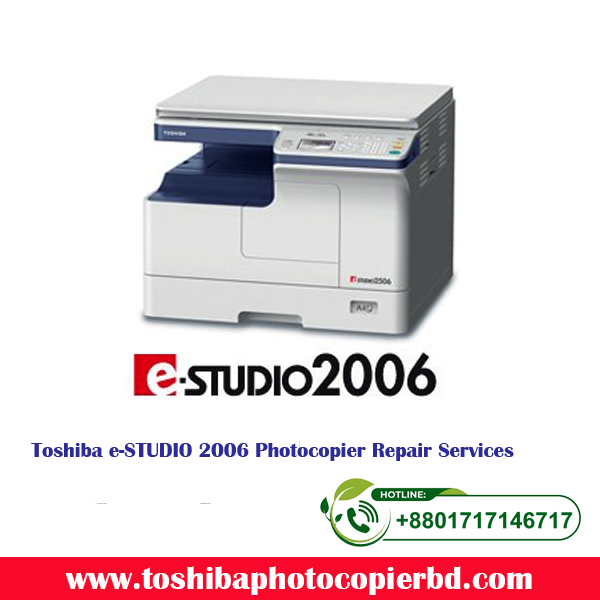
The e-STUDIO2006/2306/2506 are compact, lightweight, entry-level MFPs. In addition to black-and-white copying, this series can be used as a black-and-white printer and colour scanner, simply by connecting to a PC via USB cable.
Features
Compact Design
The e-STUDIO2506 series offers a compact body measuring 575 × 540 × 402mm. Weighing just 25.5kg, this series can be placed anywhere in the office and are easy to install.
All-in-one Design
Printing, scanning and copying are all standard features in the e-STUDIO2506 series, eliminating the need to purchase and install separate devices for these tasks. Total footprint is reduced, and management is simple, as consumable purchases and maintenance are required for only one device.
Color Scanner
The e-STUDIO2506 series is equipped with a colour scanner, so colour originals can be saved in their original colours. Because originals can be scanned without any colour loss, users avoid the need to purchase a separate colour scanner.
Simple Operation
The operating panel is equipped with a four-line LCD and feature buttons, including a directional arrow key, so users can call up the features they need on the menu screen simply and easily. This interface delivers intuitive and efficient operation.
Eco-friendly
The e-STUDIO2506 series supports the Energy Star international environmental standard, providing excellent energy-saving performance. These environmentally friendly series eliminate the use of many harmful materials, such as lead and mercury.
Specifications
Model
e-STUDIO2006
e-STUDIO2306
e-STUDIO2506
General Feature
Copy / Print Speed (ppm)
20
23
25
Warm-up Time
Approx. 20 sec.
Memory
512MB
Storage
–
Dimension (W × D × H)
575 × 540 × 402 mm / 22.6″ × 21.3″ × 15.8″
Weight
Approx. 25.5 kg / 56.2 lbs
Input Paper Capacity
Standard
350 sheets
Maximum
600 sheets
Available Paper Weight
64 – 163 g/m² / 17 – 90lbs. Index
Available Paper size
A5-R to A3 / ST-R to LD
Document feeder
Optional 50-sheet RADF
Duplexing
Standard
Finishing Option
–
Copier Feature
First Copy Speed
7 sec. (A4) / 7.1 sec (LT)
Resolution
2,400 × 600 dpi (with soothing)
Multiple Copy
Up to 999
Printer Feature
Resolution
600 × 600 dpi, 2,400 × 600 dpi (with soothing)
PDL
PCL6
Interface
Standard
USB (High speed)
Option
–
Scanner Feature
Resolution
150/300/600* dpi
Max. Scan Speed
Color
7 spm (300 dpi)
B & W
25 spm (all resolution)
Data format
TIFF, PDF, JPEG**
Scan Protocol
– (USB connection)
Scan features
USB, TWAIN
Internet Fax
–
Fax Feature (option)
Communication mode / Modem Speed
–
Data Compression
–
Number of Lines (Std. / Max.)
–
Phonebook
–
Security Feature
Standard
Access Code
Optional
–
* Colour scan at 600dpi is for A5-R/ST-R only. ** When using “Scan to USB” function. *** Specifications and options vary by region.
Copier House BD: Your Go-To Copier Repair Service in BD
Are you in need of high-quality copier repair services in Bangladesh? Look no further than Copier House BD! With years of experience in the industry, Copier House BD has established itself as a trusted provider of copier repair services, sales, and maintenance in Bangladesh. Whether you need a quick fix or a complete overhaul of your copier, Copier House BD has got you covered.
Copier Repair Services
Copier House BD offers a wide range of copier repair services to meet your specific needs. From minor issues like paper jams and ink cartridge replacements to major repairs such as circuit board replacements and motor repairs, our team of experienced technicians can handle it all. We understand the importance of having a fully functional copier, so we strive to provide quick and efficient repair services to minimize any downtime for your business.
Copier Original Toner and Ink Cartridges
Using genuine toner and ink cartridges is essential for maintaining the quality and longevity of your copier. At Copier House BD, we offer a wide selection of original toner and ink cartridges for all major copier brands. Our experts can help you find the right cartridges for your copier model and provide professional installation services to ensure optimal performance.
Accessories and Spare Parts Sales
In addition to copier repair services and toner cartridges, Copier House BD also offers a variety of copier accessories and spare parts for sale. Whether you need a new paper tray, a replacement fuser unit, or any other copier accessory, we have you covered. Our knowledgeable staff can assist you in finding the right parts for your copier and provide guidance on proper installation and maintenance.
Photocopier Repair Service Center in Bangladesh
Conveniently located in Bangladesh, Copier House BD’s service center is equipped with state-of-the-art equipment and tools to efficiently diagnose and repair copier issues. Our technicians undergo regular training to stay up-to-date on the latest copier technologies and repair techniques, ensuring that you receive the best possible service for your copier.
Why Choose Copier House BD?
Experienced and knowledgeable technicians
Quick and efficient repair services
Wide selection of original toner and ink cartridges
Competitive prices on copier accessories and spare parts
Conveniently located service center in Bangladesh When it comes to copier repair services in Bangladesh, Copier House BD is the name you can trust. With our expertise, experience, and commitment to customer satisfaction, we strive to provide the best possible service to meet your copier repair needs. Contact us today for all your copier repair, maintenance, and sales requirements! Meta Description: Copier House BD offers top-notch copier repair services, sales, and maintenance in Bangladesh. Contact us for all your copier needs!

 The e-STUDIO2006/2306/2506 are compact, lightweight, entry-level MFPs. In addition to black-and-white copying, this series can be used as a black-and-white printer and colour scanner, simply by connecting to a PC via USB cable.