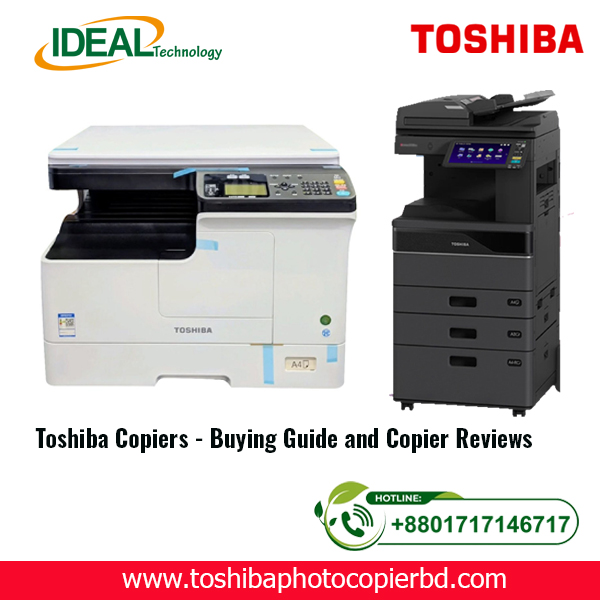
Toshiba Copiers – Buying Guide and Reviews in Bangladesh
Which Toshiba Copier Should You Choose For Your Office?
Brand names reign supreme when it comes to shopping for an office copier. Thankfully, Toshiba copiers have a great reputation for reliability in the workplace because of its other lines of quality office products. When comparing copiers, the first step is figuring out the features that your office needs in a copy machine. Below are questions you should ask before selecting a Toshiba copier.
Toshiba ranks relatively high among most users, praised for machines that work efficiently within small/medium workgroups. They also receive high marks for energy efficiency, saving on long-term operational costs. Further praise has been given in online reviews for the ease of use related to the technology itself and menu navigation in particular.
Toner use is reportedly decent, with some machines capable of printing as many as 30,000 pages on a single laser cartridge (black and white). In addition, while paper jams were reported (and are common within this category), troubleshooting through menus and instructions made clearing the jams easy.
When comparing models and trying to decide if a Toshiba copier is right for your business, start with the following three considerations:
- Multifunction or standard copier? Most businesses choose multifunction copy machines over the table-top copiers that might be found in a home office. A Toshiba multifunction is a digital copier that can copy, scan, print, and fax documents at a fast speed. Models usually differ on ppm (page per minute, or printing speed), and added features. A tabletop copier is usually inkjet, which requires cartridges that are smaller and must be replaced more often than digital toner – which can be more expensive. Most offices select digital copiers or multifunction devices as their machine of choice.
- How fast should it print? The faster the speed of the copier or multifunction, the higher the price of the machine. This is the general rule when shopping for Toshiba copiers or any other brand of copier. If you foresee long lines and frustration over a machine that’s only printing at 30 pages per minute (one page every 2 seconds), then you might want to go with a faster model.
- Black and white or color? Answering this question will help you choose between a copier in the Toshiba Small Work Group, which produces up to 20 ppm in black and white, and a large-sized Toshiba copier, which prints out 150 ppm in color. If you decide to purchase or lease a black and white Toshiba copier, you can always send color copy or presentation
orders to a copy shop.
It’s important to consider your company’s copier requirements before you shop to ensure you make the best purchase. Toshiba copiers offer a wide range of copiers but there is usually one model that is the best choice for your business.
Toshiba Copiers – Buying Guide and Reviews in Bangladesh
Are you looking to invest in a high-quality copier for your business in Bangladesh? Toshiba copiers are known for their reliability, performance, and advanced features. In this article, we will provide you with a comprehensive buying guide and reviews of Toshiba copiers available in Bangladesh.
Why Choose Toshiba Copiers?
When it comes to office equipment, Toshiba is a well-respected brand with a long history of producing top-notch copiers. Here are some reasons why you should consider investing in a Toshiba copier for your business:
- Reliability: Toshiba copiers are built to last and can handle high-volume printing tasks with ease.
- Performance: Toshiba copiers deliver exceptional print quality and fast printing speeds, making them ideal for busy office environments.
- Advanced Features: From advanced scanning capabilities to wireless connectivity options, Toshiba copiers come packed with innovative features to streamline your workflow.
With Toshiba copiers, you can expect reliable performance and exceptional quality, making them a smart investment for your business.
Buying Guide for Toshiba Copiers in Bangladesh
When selecting a Toshiba copier for your business, there are several factors to consider to ensure you choose the right model for your needs. Here are some key points to keep in mind:
1. Determine Your Printing Needs
Before purchasing a Toshiba copier, assess your business’s printing needs, including the volume of prints, types of documents, and desired print quality. This information will help you choose a copier that can handle your workload efficiently.
2. Consider Your Budget
Set a budget for your Toshiba copier purchase and explore models that fall within your price range. Toshiba offers a range of copiers at different price points, so you can find one that meets your requirements without exceeding your budget.
3. Evaluate Features and Specifications
Review the features and specifications of different Toshiba copier models to identify one that aligns with your business requirements. Consider factors such as printing speed, paper handling capacity, connectivity options, and security features.
4. Read Reviews and Ratings
Before finalizing your Toshiba copier purchase, read reviews and ratings from other users to gain insights into the performance and reliability of the model you are considering. This feedback can help you make an informed decision.
5. Compare Prices
Shop around and compare prices from different retailers to ensure you are getting the best deal on your Toshiba copier purchase. Look for promotions, discounts, and bundle offers that can help you save money.
Reviews of Top Toshiba Copiers in Bangladesh
1. Toshiba e-Studio 2010AC
The Toshiba e-Studio 2010AC is a versatile color copier that offers high-speed printing, scanning, and copying capabilities. With advanced features such as mobile printing and cloud connectivity, this copier is suitable for businesses of all sizes.
2. Toshiba e-Studio 4528A
The Toshiba e-Studio 4528A is a monochrome copier that delivers fast printing speeds and high-resolution output. With features like automatic duplexing and advanced finishing options, this copier is ideal for large work environments with heavy printing demands.
3. Toshiba e-Studio 3528A
The Toshiba e-Studio 3528A is a compact copier that combines printing, scanning, and copying functions in one device. With energy-saving features and user-friendly controls, this copier is perfect for small businesses or home offices.
A quick comparison of some of Toshiba’s current leading popular models includes: 10 August 2024
| Model | Short Description | Estimate Price |
| Toshiba e-STUDIO2323AMW | Function: A3 Copy, Print & Scan Copy/Print Speed: Up to 23 cpm/ppm Scanning: A3 Network Color Scanning Printing: A3 Black & White Network Priting RAM: 512MB, Processor: ARM9 500MHz Paper Capacity: Standard 1x 250 + 100 Sheet Interface: USB2.0,10/100 baseT, WiFi (Labeling) | 62,500.00 |
| Toshiba e-STUDIO2528A | Function: Copy, Print, Scan. Speed: 25 ppm A4, 15 ppm A3. RAM: 4GB, Storage: SSD 128GB. Display: 10.1″ Colour WSVGA Touch Screen Paper Capacity: Standard 2x 550 + 100 Sheets Print & Scanner: Built in Print & Color Scan Facilities | 165,000.00 |
Toshiba e-STUDIO3028A | Monochrome BasicMFPs. Function: Copy, Print, Scan. Speed: 30 ppm A4, 16 ppm A3. RAM: 4GB, Storage: SSD 128GB. Display: 10.1″ Colour WSVGA Touch Screen Paper Capacity: Standard 2 x 550 + 100 Sheets Print & Scanner: Built in Print & Color Scan Facilities | 165,000.00 |
| Toshiba e-STUDIO4528A | Monochrome Basic MFPs. Function: Copy, Print, Scan. Speed: 45 ppm A4, 25 ppm A3. RAM: 4GB, Storage: SSD 128GB. Display: 10.1″ Colour WSVGA Touch Screen Paper Capacity: Standard 2x 550 + 100 Sheets Print & Scanner: Built in Print & Color Scan Facilities | 3,15,000.00 |
| Toshiba e-STUDIO2020AC | Colour Basic MFPs. Function: Copy, Print, Scan. Speed: 20 ppm A4, 12 ppm A3. RAM: 4GB, Storage: SSD 128GB. Display: 10.1″ Colour WSVGA Touch Screen Print & Scanner: Built in Print & Color Scan Facilities Paper Capacity: Standard 1 x 250 + 100 Sheets + 550 Sheets | 1,18,500.00 |
| Toshiba e-STUDIO3025AC | Colour Duplex MFPs. Function: Copy, Print, Scan. Speed: 30 ppm A4, 16 ppm A3. RAM: 4GB, Storage: SSD 128GB. Display: 10.1″ Colour WSVGA Touch Screen Paper Capacity: Standard 2x 550 + 100 Sheets Print & Scanner: Built in Print & Color Scan Facilities | 425,500.00 |